
Dashboard
The Orbit Dashboard is your mission control for AI operations. It provides at-a-glance visibility into everything your agents are doing, updated in real time via Livewire.
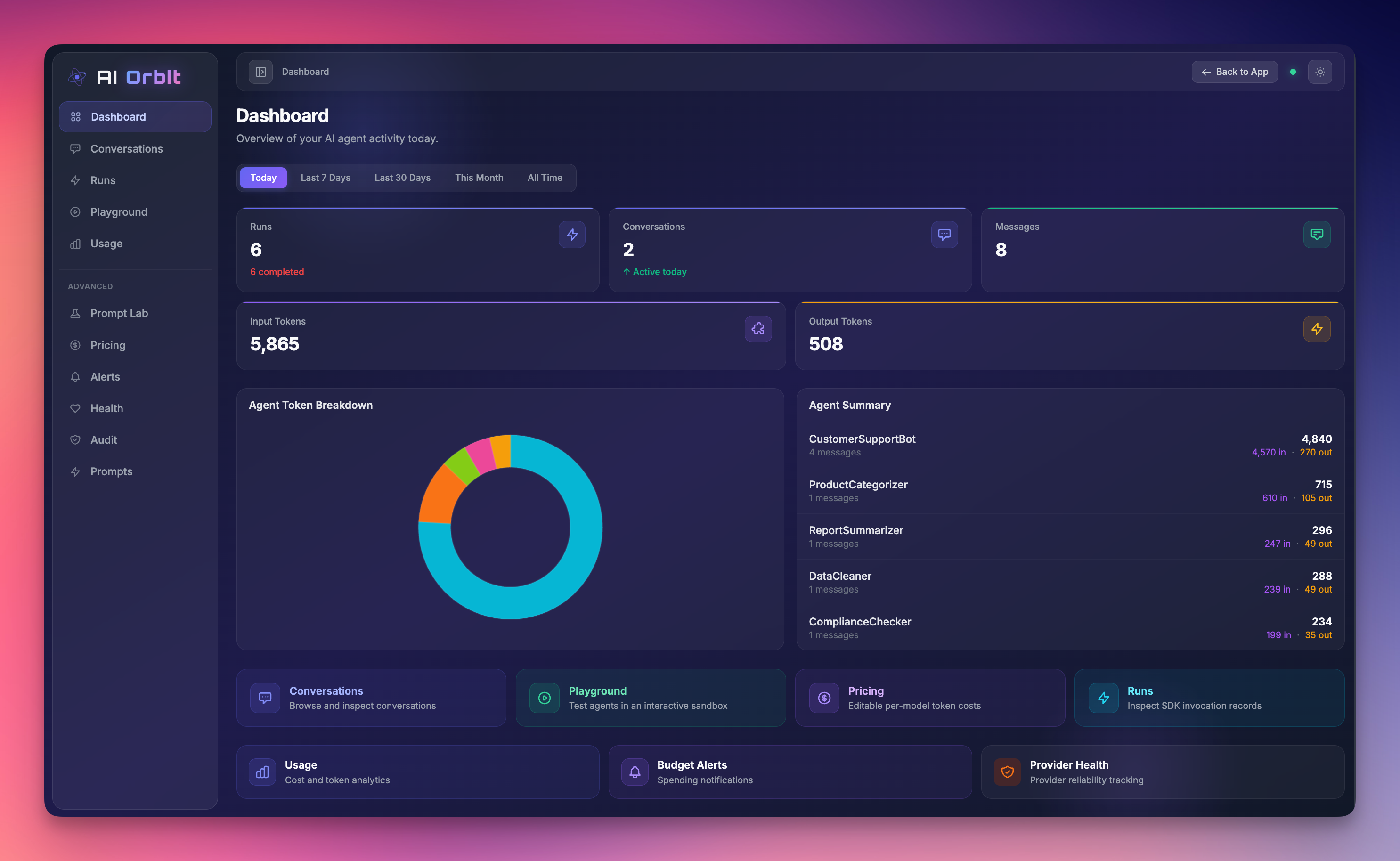
What You'll See
When you open /ai-orbit, the dashboard presents a comprehensive overview:
Stats Cards
Four key metrics displayed as stat cards with period selection:
| Stat | Description |
|---|---|
| Conversations | Total conversation threads in the selected period |
| Messages | Total messages exchanged across all conversations |
| Input Tokens | Cumulative prompt tokens consumed |
| Output Tokens | Cumulative completion tokens generated |
Time Period Selector
Switch between periods to analyze trends:
- Today — Current day's activity
- Last 7 Days — Rolling week view
- Last 30 Days — Rolling month view
- This Month — Calendar month (from the 1st)
- All Time — Complete historical data
Agent Breakdown
A detailed table showing activity per agent class:
| Column | Description |
|---|---|
| Agent | Fully qualified class name |
| Messages | Count of messages sent/received |
| Model | Primary model used |
| Input Tokens | Prompt tokens for this agent |
| Output Tokens | Completion tokens for this agent |
| Total | Combined token count |
| Cost | Estimated cost using the Pricing Matrix |
Token values are displayed as raw counts for precision — no M/K masking.
This helps you identify which agents are consuming the most tokens and which models they're using.
Provider Count
The dashboard also tracks how many distinct AI providers are active, giving you visibility into provider diversification.
Quick Navigation Cards
Below the stats, you'll find link cards for jumping to related sections:
- Usage — Full analytics and cost breakdowns
- Pricing — Edit per-model pricing rules
- Alerts — Budget threshold configuration
- Health — Provider reliability monitoring
- Prompts — Saved prompt library
How It Works
The dashboard is powered by the TodayStats Livewire component, which queries the Laravel AI SDK's tables:
agent_conversations— Conversation metadataagent_conversation_messages— Individual messages with usage data
Orbit safely checks for table and column existence before querying, so the dashboard degrades gracefully if the SDK migrations haven't been run yet.
Token Aggregation
Token counts are extracted from the usage JSON column on messages:
{
  "prompt_tokens": 156,
  "completion_tokens": 89,
  "total_tokens": 245
}
Orbit uses JSON_EXTRACT for efficient aggregation at the database level.
Agent Detection
The agent column on messages is used to group activity. If your agents don't populate this field, the breakdown table will show limited data. Ensure your agents set the agent attribute on conversation messages.
Use Cases
Daily Standup Check
Check the "Today" view each morning to see overnight agent activity, conversation volume, and token burn rate.
Cost Spike Investigation
Switch to "Last 7 Days" and sort the agent breakdown by total tokens to identify which agent caused a cost spike.
Model Migration Tracking
After switching an agent to a new model, monitor the breakdown table to confirm the model change took effect and compare token efficiency.
Capacity Planning
Use "All Time" view to understand long-term growth patterns and plan for scaling.
Health Check
If you see a setup banner instead of stats, Orbit's health check has detected missing tables. Run:
php artisan migrateThe health check verifies:
agent_conversationstable existsagent_conversation_messagestable exists
Customization
The dashboard view is a standard Blade template. You can override it by publishing views:
php artisan vendor:publish --tag=ai-orbit-viewsThen edit resources/views/vendor/ai-orbit/dashboard.blade.php.
The Livewire component can also be extended — see Extending Orbit.